
In this article
- Why does no-code matter when building an AI chatbot?
- How do you create an AI chatbot without code?
- Step 1: How do you set up your Dante AI account?
- Step 2: How do you create a new AI chatbot?
- Step 3: How do you train your AI chatbot with your data?
- Step 4: How do you customize your AI chatbot?
- Step 5: How do you embed your chatbot on your website?
- How long does it actually take?
- What should you test before launching?
- Common mistakes to avoid
- How Dante AI simplifies chatbot building
- Expected results after launching
How do you create an AI chatbot for your website?
You can create an AI chatbot for your website using a no-code builder. Create an account, upload your content, train and customize your AI agent, then embed it on your site with a single snippet. No coding required.
Why does no-code matter when building an AI chatbot?
Building AI tools used to require developers, API integrations, and technical setup. Today, no-code chatbot builders remove that barrier.
A no-code chatbot platform allows you to:
- Launch quickly without engineering resources
- Update information without developer involvement
- Train your chatbot using existing content
- Deploy across your website without a developer
For businesses that need fast implementation, no-code eliminates friction.
How do you create an AI chatbot without code?
Creating an AI chatbot with Dante AI follows five simple steps.
Try it yourself. Train an AI agent on your website, docs, or files. No code needed.
Step 1: How do you set up your Dante AI account?
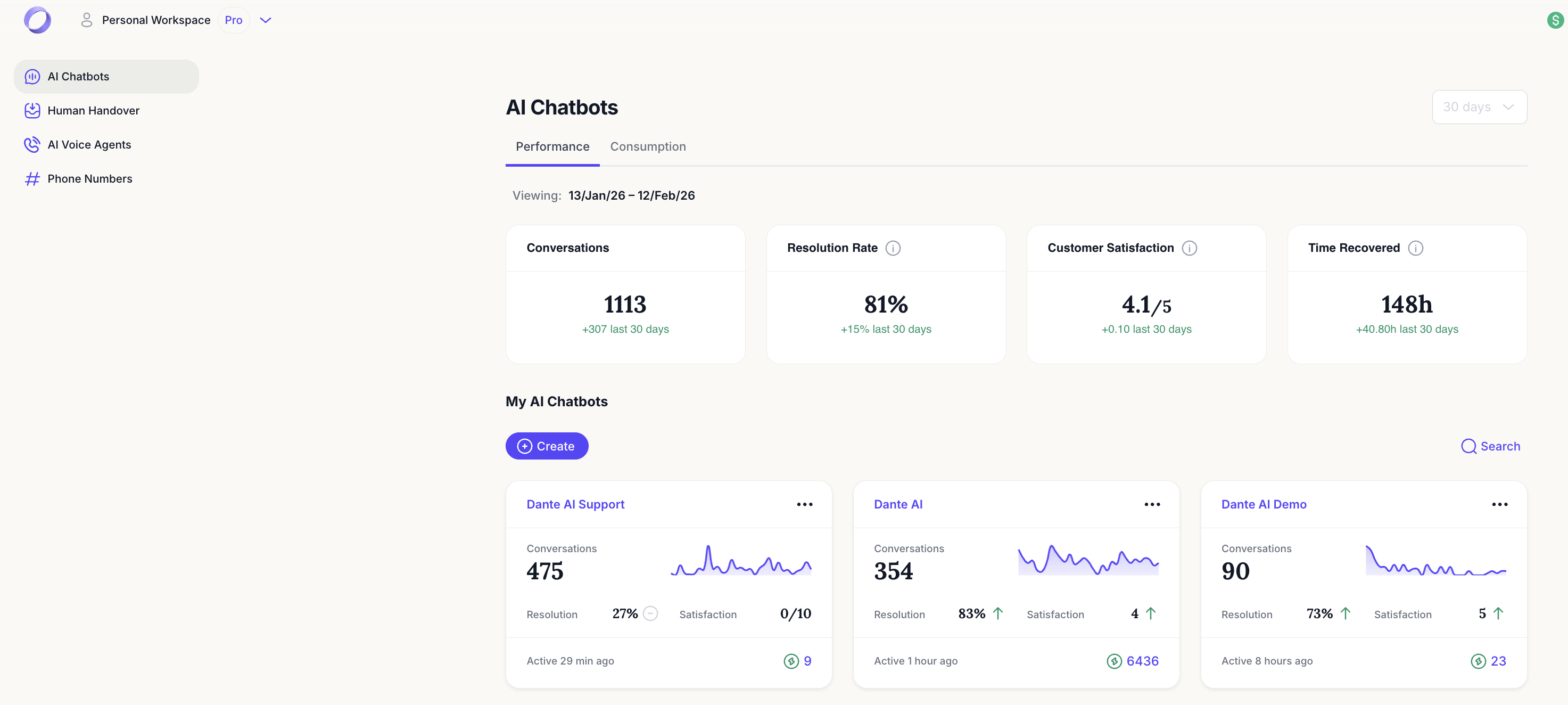
Start by creating your account on Dante AI.
After signing up:
- Access your dashboard
- Review your workspace
- Prepare the content you want your chatbot to learn from
For a fuller walkthrough, see our guide on how to implement an AI chatbot from scratch.
Step 2: How do you create a new AI chatbot?
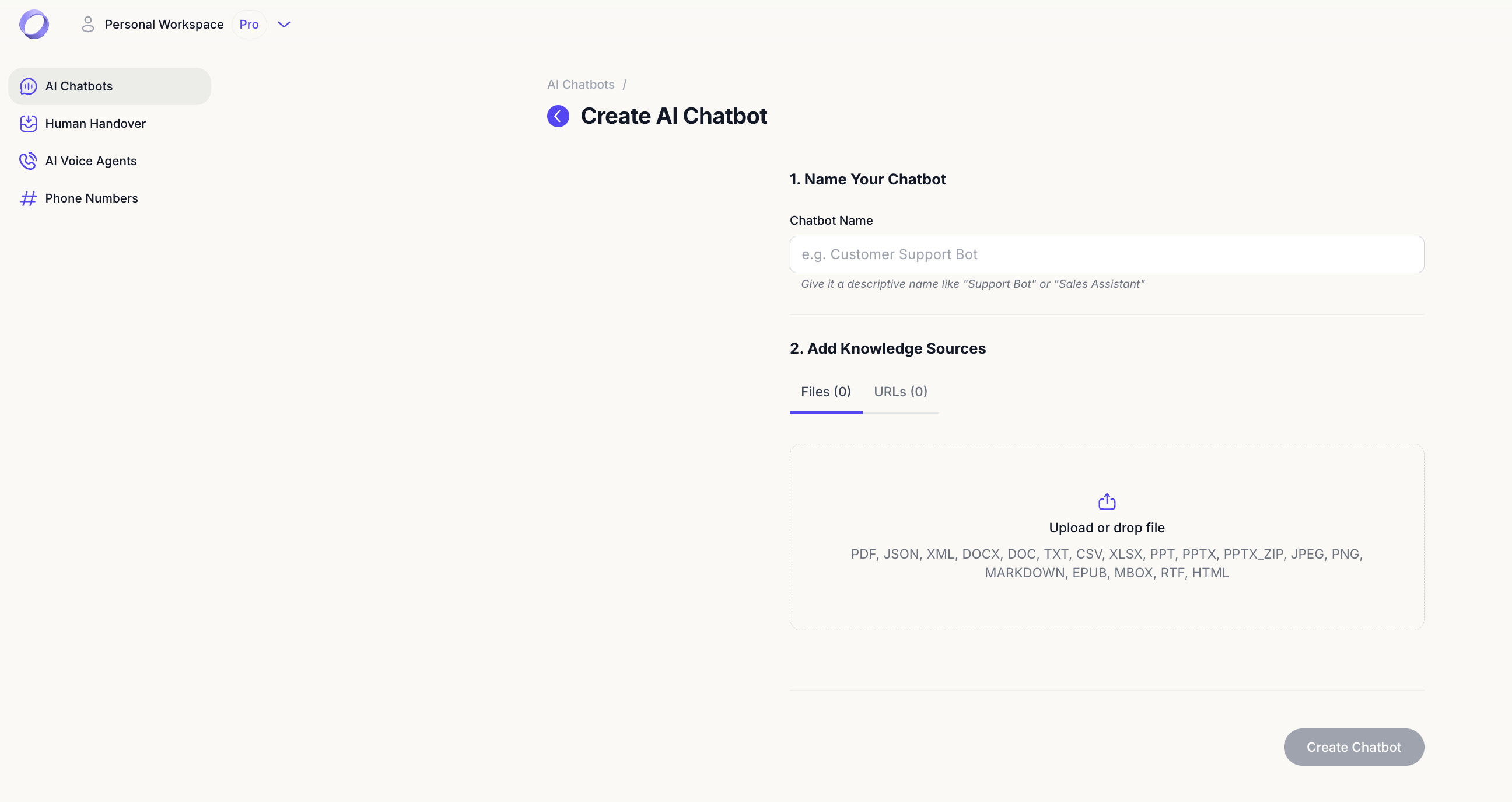
Inside your dashboard:
- Click “Create”
- Name your chatbot
- Choose your configuration
This initializes your chatbot environment.
Prefer a chat widget in the corner of your site? See how to add AI chat to your website.
Step 3: How do you train your AI chatbot with your data?
Training is where your chatbot becomes useful.
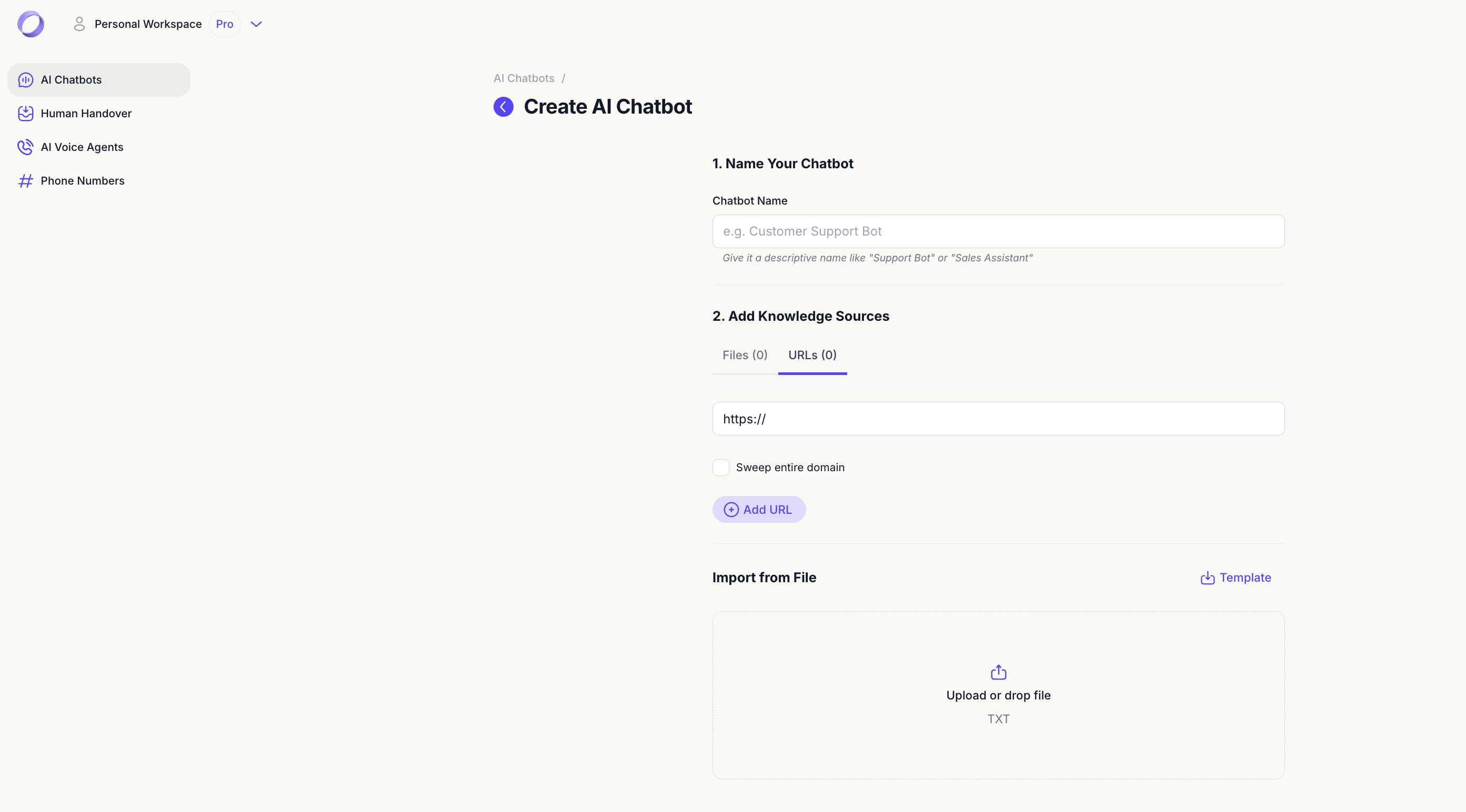
Dante AI chatbots are trained using:
- Uploaded files such as PDFs or documents
- Website URLs
- Knowledge-based resources
Uploading files
Go to your chatbot’s data section and upload relevant files. This could include:
- FAQs
- Service guides
- Product documentation
- Policy documents
Adding URLs or videos
You can also add:
- Website URLs
- Blog posts
- Resource pages
The AI agent will use this content to generate accurate answers. For tips on getting this step right, read our guide on how to train a chatbot on your own data.
Step 4: How do you customize your AI chatbot?
Customization ensures the chatbot matches your brand and workflow.
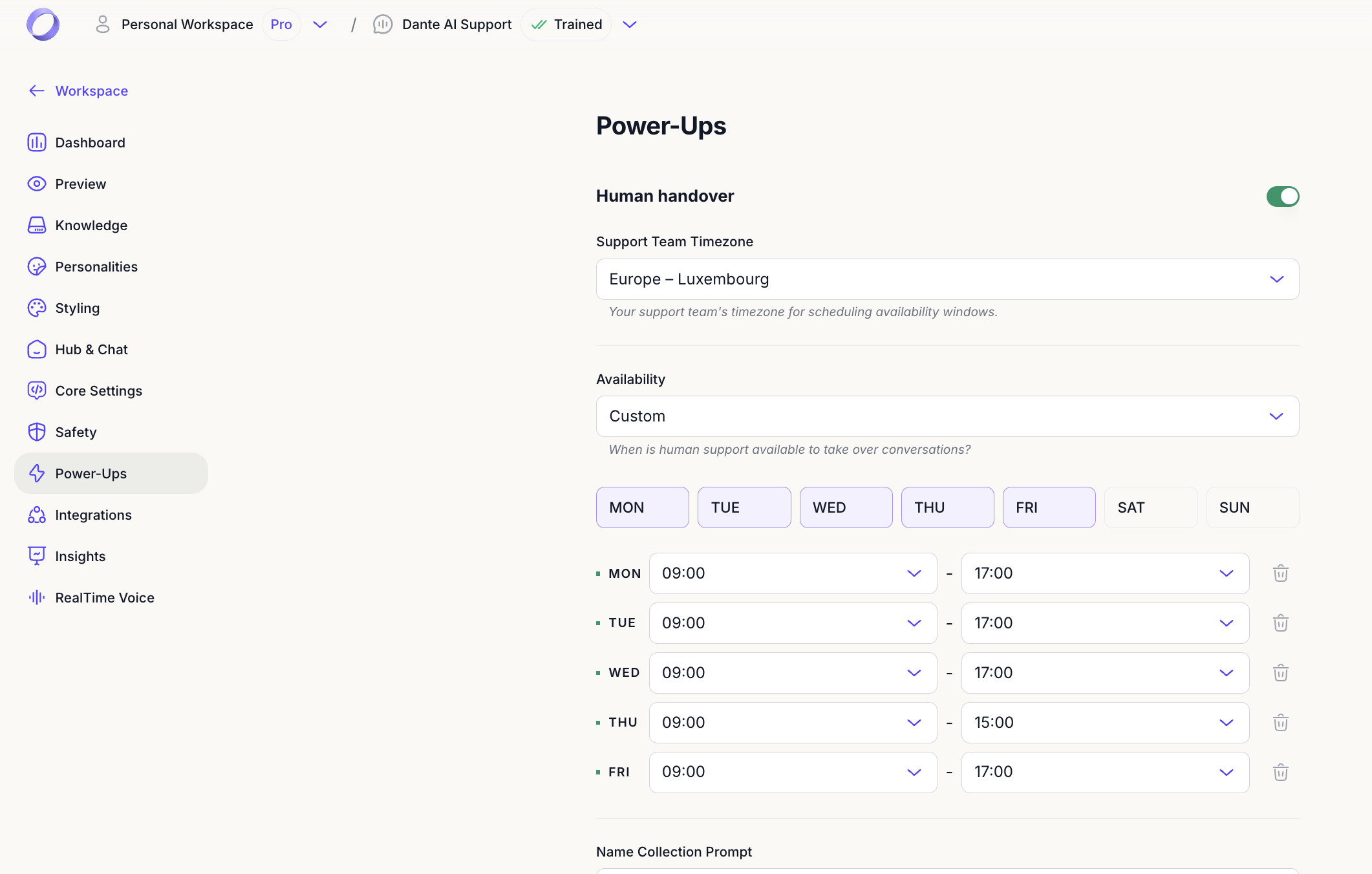
With Dante AI, you can:
- Define conversation tone
- Enable Human Hand Off
- Add scheduling or appointment buttons
- Control where the chatbot appears in conversation
Human Hand Off allows users to connect with a live agent inside the same chat at chosen points.
Scheduling buttons can link to any existing booking tool.
You can also choose which model powers your AI agent, including the GPT-5.6 tiers, without retraining anything.
Step 5: How do you embed your chatbot on your website?
Once trained and customized:
- Access your chatbot settings
- Copy the embed code
- Paste it into your website
No coding knowledge is required beyond placing the embed script into your site builder.
How long does it actually take?
It depends on how much content you point it at. A single page is ready long before a large site with hundreds of pages.
You do not have to sit and watch. Training runs in the background, you see progress as it goes, and the sandbox opens as soon as your agent is ready to answer.
What should you test before launching?
Before going live:
- Ask common customer questions
- Verify answers are accurate
- Check Human Hand Off triggers correctly
- Confirm scheduling buttons work
- Review conversation logs
Every interaction is logged, showing what users asked and when.
Common mistakes to avoid
Even with no-code tools, mistakes can slow you down.
Avoid:
- Uploading outdated documents
- Forgetting to test edge cases
- Overloading the chatbot with irrelevant files
- Launching without reviewing conversation logs
Clean, structured content improves chatbot performance.
How Dante AI simplifies chatbot building
Dante AI is built for simplicity and scalability.
With Dante AI, you can:
- Train AI chatbots using uploaded content and URLs
- Answer questions instantly
- Enable Human Hand Off
- Add scheduling buttons
- Track interactions with logs
- Enable AI Voice for real-time spoken conversations
When we speak with new users, the biggest hesitation is not technical. It is clarity. Most businesses already have the information their chatbot needs. The difference between a successful launch and a frustrating one usually comes down to organizing content before uploading it. The simpler the structure, the better the results.
You can build and test your first AI agent on the free plan, which includes 100 message credits per month, then move to a paid plan from $40 per month when you need more volume.
Expected results after launching
After launching your AI chatbot, you can expect:
- Faster responses to website visitors
- Reduced repetitive support questions
- Higher engagement on key pages
- Better visibility into customer intent
- More efficient use of human agents
Further reading
Keep going with these guides from the Dante AI library:
- Free AI Chatbot: How to Build One for Your Business
- AI Knowledge Base: What It Is and How to Build One
- How To Create AI Avatars from Text or Photos
- How to Deploy Conversational AI
- AI-Powered Onboarding: How Businesses Use Chatbots to Welcome and Train New Users
- How to Boost Your Business with a Free AI Chatbot Builder Software
- AI Chatbots in B2B: How to Support Long Sales Cycles Without Lifting a Finger